



Statistics change, competitors create more comprehensive content, search intent evolves, and even Google’s algorithms update over time. A blog that was highly relevant two years ago may no longer give readers the complete answer they need today.
Let’s say a blog on skin cancer detection that once brought in 1,000 visitors a month now gets only 400. The content hasn’t disappeared—it has simply become outdated while competitors have published newer, more useful information.
Choosing suitable blog writing services like Content Freelancing can help you prevent content decay, creating more polished content for better engagement. Here’s how we do it.
Content Decay: How to Find and Fix Blogs
Your blog publishes weekly. There is no traffic. The reason isn’t your new content — it’s your old content quietly dying. Imagine a blog that once attracted thousands of visitors but now barely gets noticed.
There’s no reason to panic; this can be fixed. Instead of abandoning these older posts, businesses need to understand why they are declining and refresh them with updated facts, better examples, relevant keywords, and stronger internal links to regain their value and visibility.
What Is Content Decay?
Content decay is not simply about how old a blog is. A five-year-old article can still perform well if it remains accurate and useful. It happens when you start to lose organic search rankings, CTR, and web traffic over time as the content becomes outdated or irrelevant.
Currently, Ahrefs guidance describes this process as a lifecycle from initial growth and peak traffic to plateau and eventual decline.
How Content Decay Differs from a Google Penalty?
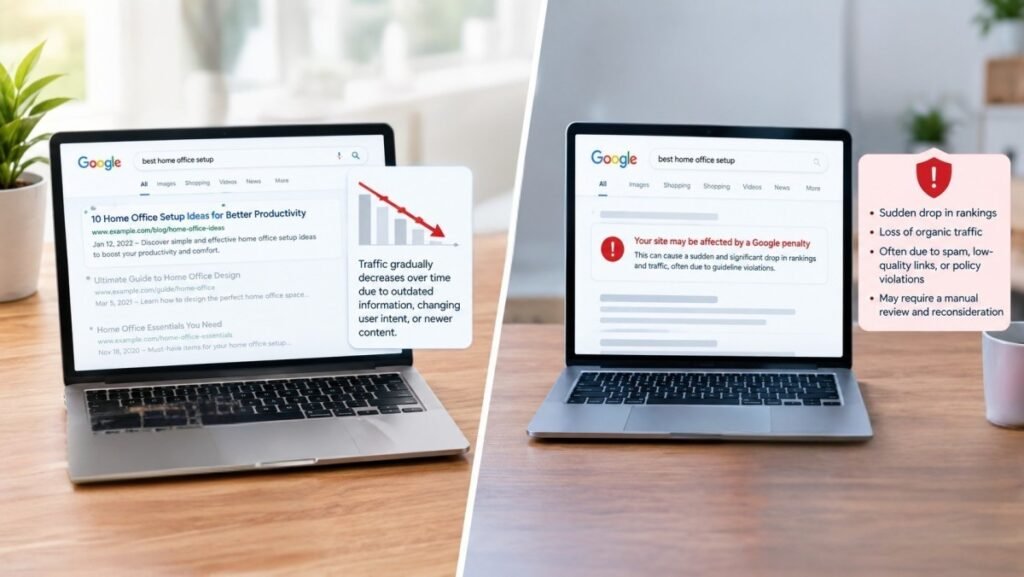
A drop in blog traffic does not always mean Google has penalized your website. Here are five differences that will help you understand this difference better.
- Gradual vs. sudden decline: Content decay usually happens slowly over months. But a Google penalty or core algorithm hit usually causes traffic to drop sharply almost overnight.
Example: A “Best SEO Tools” article drops from 2,000 to 1,200 monthly visitors as newer competitors publish updated lists. - Refreshing vs. fixing violations: Hire blog writers in Kolkata, India to recover decayed content that can otherwise reduce visibility.
Example: Adding 2026 statistics, new examples, and updated screenshots with the help of professional SEO writers can improve an old marketing guide. - No penalty required: A page can lose traffic without receiving any Google penalty.
Example: Three competitors publish more comprehensive articles targeting the same search intent, causing your previously strong post to move from position 2 to position 8.
Signs Your Blog Is Losing Traffic
Content decay is slow and steady. Here are some signs to notice it before it becomes a serious issue:
- Losing SERP features: You lose your placement in featured snippets or AI search summaries, as tracked in Google Search Console.
- Losing Keyword Rankings: Your main target keywords drop by two or more positions, moving down the first page or sliding to page two.
- Declining Click-Through Rates (CTR): Are people seeing your article but choosing not to click? The page still appears in search results, but fewer people click because the snippet, title, or publication date looks outdated. According to Google Ads’ guidelines, declining click-through rate (CTR) is a major red flag.
Why It Happens Even to High-Quality Blog Posts
Proper content alone is not enough to stop content decay. Here’s what actually matters:
- Lack of Promotion and Distribution: Writing a great piece is only half the battle; without actively sharing your work on social platforms or through newsletters, reach becomes limited.
Example: I published a detailed guide on “How to Choose the Right Digital Manager for a Small Business,” but I never shared it on LinkedIn, email newsletters, or social media. Even though the content is useful, only a small number of people could discover it.
- Poor Readability and Formatting: A poor content refresh strategy or missing structural cues turn readers away before they can appreciate the writing’s actual value.
Example: I had written a 2,000-word guide on “How to make latte coffee at home,” but presented everything in large paragraphs without headings, bullet points, or visuals. A reader looking for a quick exercise routine may leave the page because of its poor readability.
- Ignoring Search Intent: If a post doesn’t match what users are actually typing into search engines or what format they expect, search algorithms will pass it by.
Example: I had written a 1,500-word article explaining “What is product development?” People searching for “best product development services for small businesses” actually want product comparisons and recommendations. Although my article is informative, it does not satisfy search intent. It is advisable to work with reputable agencies like Content Freelancing, where we keep the focus on the intent to gain higher engagement.
Gradual Ranking Drops in Google Search Console

Yesterday, your page was in position three. Today, it’s sliding down the search results like it tripped on a loose shoelace. The truth is, a Google ranking drop can happen for many reasons. Some are minor and temporary. Others point to deeper issues with technical SEO, content quality, search intent, or site authority.
I may notice that my blog on “Best SEO team requirement for Small Businesses” ranked around position 4 and received 1,500 clicks a month last year, but has slowly slipped to position 9 with only 700 clicks. This does not necessarily mean Google has penalized my site; it could indicate that competitors have published fresher content that might be more suitable.
Declining Click-Through Rate Despite Stable Position.
Many websites misinterpret this signal and focus on technical fixes instead. But in reality, this is a behavioral problem, not a technical one. The reasons are stated below:
- A weak meta description might hamper your online visibility. If the page ranks well, but its description does not clearly explain what readers will gain, it can lead to a loss of viewers’ trust.
Example: A vague description of “famous tourist spots” may lose clicks to a competitor offering a clear comparison and practical tips. - Featured snippets often give users a direct answer right on the search results page. When people get what they need instantly, they don’t feel the need to click through. This can lead to decaying blog posts in terms of audience return and engagement.
For example: A blog ranks for “best gifting ideas”, but Google’s featured snippet already provides a short definition at the top of the results, so users may get their answer without clicking the blog.
Losing Visibility in AI Overviews and AI Search Results
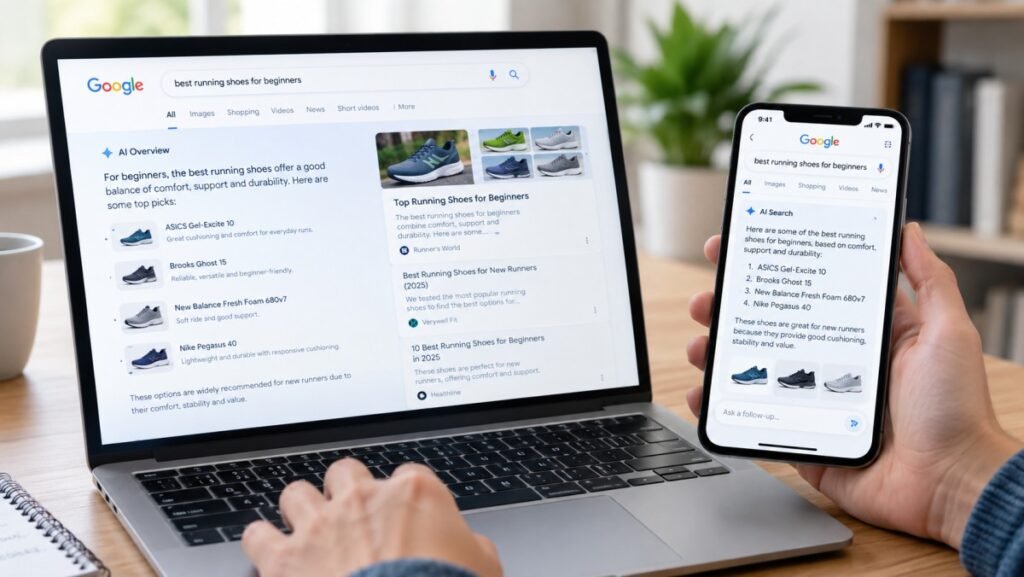
To tell if your traffic drop started when AI Overviews rolled out, review your site’s analytics traffic data from the time when Google began testing AI Overviews. If your traffic dropped gradually over months, other factors (like weak SEO) are more likely responsible.
- Zero-Click Interception: AI summaries combine data from multiple sites into one answer box, meaning users get what they need without scrolling or clicking.
- Format Mismatch: Content that lacks clear structure, direct answers, or machine-readable formatting is harder for AI models like Gemini or ChatGPT to extract and reference
- Citation vs. Ranking: Your traditional organic rank might stay high, but your clicks drop if the AI engine does not cite your specific URL inside the summary block.
How to Find Decaying Blog Posts
If you’ve published content before, running a regular content audit on your blogs or resource pages helps ensure older pieces don’t quietly drop in performance over time. Here’s the content decay checklist:
- Use Google Search Console: Open the Performance report, select the date filter to compare the last 3 to 6 months against the previous equivalent period, and sort the pages list by the largest negative click or impression difference. This is one of the most important ways to detect and fix decaying blog posts.
- Monitor Organic Traffic Trends: Start with Google Analytics. Compare traffic month to month or year to year for each URL. If you notice a steady drop beyond seasonal changes, that’s a warning sign.
- Leverage SEO Tools: Use platforms like Ahrefs or Semrush to check your top Pages report, apply a filter for declining traffic over a 12-month window, and look for keyword ranking drops.
- Check Content Age: Flag any older blog posts that haven’t been updated in over 18 months, especially those covering rapidly changing topics.
Using Google Search Console to Spot Traffic Drops

Google Search Console can help identify which pages are losing clicks, impressions, or rankings and when the decline started. Google’s own traffic-drop guidance recommends comparing different time periods and checking the Pages report to find URLs that lost the most clicks.
Saramin, one of South Korea’s largest job platforms, began using Google Search Console in 2015 to identify and fix crawling issues. This initially increased organic traffic by 15% and continued to improve after further SEO improvements.
Fewer Backlinks or Referral Traffic Over Time
Organic traffic refers to visits that come to your site via unpaid (i.e., “organic”) search results. When other websites stop linking to an older blog, it may gradually lose authority and referral visitors.
Example: A marketing guide that once received links from industry websites may see fewer visitors after those links are removed or newer resources replace them, contributing to declining traffic.
Comparing Year-over-Year vs. Month-over-Month Data
Reoptimizing old blog posts is generally done to gain organic traffic. Here’s a year-over-year vs. month-over-month data comparison.
| Factor | Year-over-Year | Month-over-Month |
|---|---|---|
| What it compares | Blog performance with the same period last year | Blog performance with the previous month |
| Best for | Finding long-term content decay | Spotting recent traffic drops |
| What to check | Organic clicks, impressions, rankings, and CTR | Sudden changes in clicks, rankings, and CTR |
| What it tells you | The blog may be losing relevance over time | The blog may have experienced a recent performance issue |
Cross-Checking with Ahrefs or Semrush
Cross-checking data between Ahrefs and Semrush is essential because both platforms rely on estimated models and algorithms. Here’s why cross-checking matters
- Traffic Estimates: Both tools calculate traffic by multiplying keyword rankings by estimated click-through rates (CTR), which can introduce a significant variance or error gap compared to real metrics.
- Metric Variations: Keyword difficulty, search volumes, and backlink counts use proprietary formulas unique to each platform.
- Ground Truth Validation: Always verify platform data against Google Search Console for actual impressions, clicks, and real keyword positions.
Common Causes of Content Decay
- Outdated information is the main reason for decay. Articles that have outdated statistics or obsolete trends quickly lose credibility. Search engines notice when users leave due to stale content and start to lower their rankings.
- SEO is an ongoing race with topical authority in the lead. As competitors publish newer, more comprehensive content, older pages can gradually lose visibility and rankings, leading to noticeable drops in organic traffic.
- Backlinks can help a page build authority and attract referral traffic. If websites remove old links, replace them with newer resources for better visibility.
How Often Should You Audit Your Blog for Content Decay?
The SEO content audit process needs continuous evaluation. Take a closer look below:
- Every 3 months (Quarterly): Best for active blogs, fast-changing topics (like tech or finance), and your top-earning pages.
- Every 6 months (Biannual): The standard baseline for most blogs and average-sized websites to catch lost traffic.
- Every 12 months (Annual): Works for small, static sites or deep-archive posts that rarely change.
Building a Content Decay Decision Matrix (Update, Consolidate, or Remove)
When an older blog starts losing traffic, its performance and relevance should be assessed before deciding whether to update, consolidate, or remove it.
1. Update the Content
A blog should be updated when the topic is still valuable, but the information has become outdated or incomplete.
Example: A “Best tools for digital marketing” article published in 2023 may still attract visitors but contain outdated tools and pricing. Updating the list, statistics, and examples can improve its relevance.
2. Consolidate the Content
Similar articles should be consolidated when they target the same audience and search intent.
Example: A website has separate posts titled “Best blog writing agencies for small businesses” and “Top content writing agencies for small businesses.” Combining them into one comprehensive guide can prevent keyword overlap and create a stronger resource.
3. Remove the Content
A blog may be removed when it has little traffic, no valuable backlinks, outdated information, and no useful purpose for readers.
Example: A 2019 article about a skincare product that no longer exists may provide little value. If there is no suitable replacement, removing it may be the better option.
Final Takeaway
Content decay is not always a reason to start from scratch. By regularly monitoring traffic, rankings, backlinks, and search intent, businesses can identify declining blogs early and decide whether to update, consolidate, or remove them for better engagement and leads.
FAQs:
1. What is the difference between content decay and content pruning?
A slow decline in search performance, views, and usefulness for a page that used to do well is termed content decay, whereas a big-picture cleanup process where you evaluate your entire site to handle underperforming pages is termed pruning.
2. Why are your old blog posts losing traffic?
Old blogs have become obsolete. Proper information, correct data, and statistics need to be provided to beat competitors and gain higher rankings. At agencies like Content Freelancing, we provide updated content with proper statistics and keyword placements for better reach.
3. How can Google Search Console identify declining content?
Comparing recent data with previous periods helps reveal which blog posts are gradually losing visibility and may need to be updated, consolidated, or removed.
4. Should you change the published date when refreshing an old blog post?
This should be done only when the content has been substantially updated. Otherwise, keep the original date and mention when it was last updated.
5. Is it better to update, consolidate, or delete decaying blog posts?
It depends on the page and the type of content they provide. Update valuable content, consolidate overlapping posts, and delete content that is outdated and no longer useful.
6. How often should you audit your blog for content decay?
A quarterly audit is a good starting point, with more frequent checks for high-traffic or time-sensitive content.

As an author and freelance content writer, Kalpana Basu crafts high-converting website content and articles. Her professional copywriting services and website blog writing help brands build influence, connect with readers, and scale.